
Sound Event Detection
Sound Event Detection (SED) identifies the sound events present in an audio file—sirens, gunshots, baby cries, glass breaks, and over 100 other categories. SED is the core capability of Cochl.Sense and is available across both the Cloud API and the Edge SDK.
This page covers SED via the Cloud API. For on-device detection, see Edge SDK → Sound Event Detection.
1. How it works
When you upload a file, the API runs a sliding-window classifier and returns the detected events per window. Each window has a list of candidate sound classes with confidence scores and a time interval.
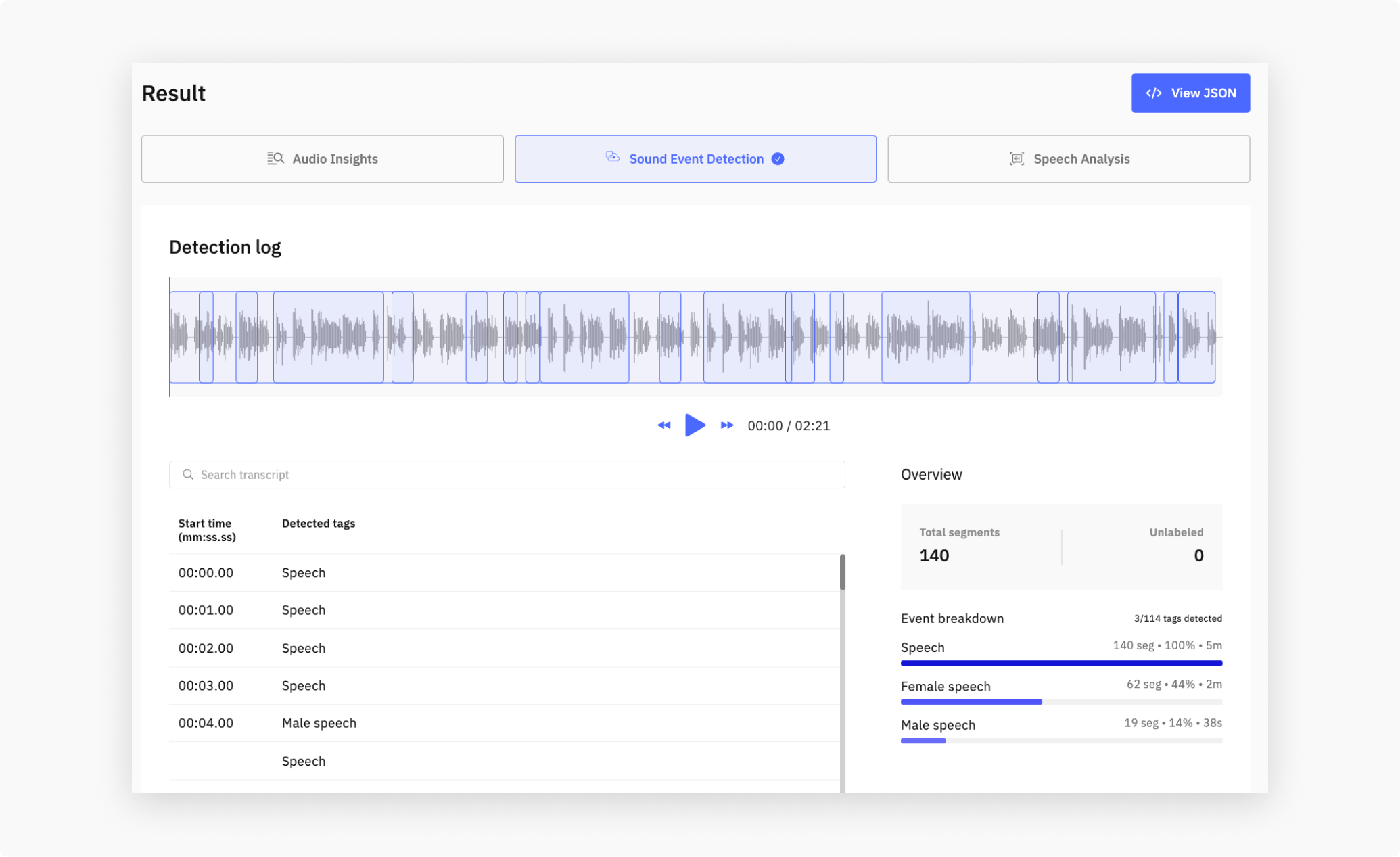
The model recognizes 100+ tags across eight categories. The example above shows Speech detection; the full catalog covers everything from sirens and gunshots to vacuum cleaners and bird chirps. A taste of what each category covers:
For the complete list, see Sound Tags.
2. Detecting sound events with Python
Use cochl.sense.IntegratedApi—the multi-feature client. It returns SED in the unified Integration API shape (classes[] / confidence), and can run Speech Analysis and Audio Insights in the same call.
cochl.sense.Client (SED-only, legacy tags[] / probability shape) will be deprecated—it still works today, but new integrations should use IntegratedApi. If you’re still on Client, see Legacy <code>Client</code> (will be deprecated) below for the migration mapping.Make sure you’ve completed Getting Started—you need a project key and the cochl Python library installed.
from cochl.sense import IntegratedApi, IntegratedApiOptions

api = IntegratedApi('YOUR_API_PROJECT_KEY')

job = api.analyze_file(
    'your_file.wav',
    IntegratedApiOptions(sound_event_detection=True),
)

result = api.get_completed_result(job['job_id'])
for chunk in result['sense']['results']:
    top = chunk['classes'][0]
    print(f"[{chunk['start_time_sec']:.2f}–{chunk['end_time_sec']:.2f}] "
          f"{top['class']} ({top['confidence']:.2f})")
Running this on a short baby-monitor clip prints something like:
[ 0.00– 1.00] Baby_cry (0.92)
[ 1.00– 2.00] Baby_cry (0.88)
[ 2.00– 3.00] Speech (0.74)
[ 3.00– 4.00] Speech (0.81)
[ 4.00– 5.00] Baby_cry (0.61)
And the result dict it came from:
{
  "sound_event_detection": {
    "status": "success",
    "results": [
      {
        "start_time": "00:00.00",
        "end_time": "00:01.00",
        "start_time_sec": 0.0,
        "end_time_sec": 1.0,
        "classes": [
          { "class": "Baby_cry", "confidence": 0.92 },
          { "class": "Speech",   "confidence": 0.18 }
        ]
      },
      {
        "start_time": "00:01.00",
        "end_time": "00:02.00",
        "start_time_sec": 1.0,
        "end_time_sec": 2.0,
        "classes": [
          { "class": "Baby_cry", "confidence": 0.88 }
        ]
      }
    ]
  }
}
Set speech_analysis=True in the same IntegratedApiOptions call to also transcribe speech. Audio Insights can be added on top, but it requires both Sound Event Detection and Speech Analysis to be enabled — see Cloud API → Getting Started → Valid Service Combinations for the full validity matrix.
Legacy Client (will be deprecated)
The original single-feature cochl.sense.Client will be deprecated. It still works today and returns SED-only results in the legacy tags[] / probability shape. Use <code>IntegratedApi</code> for new work; the snippet below is for maintaining existing code only.
import cochl.sense as sense
from cochl.sense import Result

api_config = sense.APIConfigFromJson('./config.json')
client = sense.Client(
    'YOUR_API_PROJECT_KEY',
    api_config=api_config,
)
result: Result = client.predict('your_file.wav')

print(result.events.to_dict(api_config))
Each detected event:
{
  "start_time": "0:00:03",
  "end_time": "0:00:05",
  "start_time_sec": 3.0,
  "end_time_sec": 5.0,
  "tags": [
    { "name": "Baby_cry", "probability": 0.92 }
  ]
}
For the summarized form (one event per merged window):
print(result.events_summarized(api_config))
Migrating to IntegratedApi — the field rename pattern:
Legacy Client shape | Integration API shape |
|---|---|
tags[].name | classes[].class |
tags[].probability | classes[].confidence |
top-level: events[] (one per merged window) | top-level: sound_event_detection.results[] (one per inference window) |
start_time (HH:MM:SS) and start_time_sec | start_time / end_time (MM:SS.SS, or HH:MM:SS.SS for files ≥ 1 hour) and start_time_sec / end_time_sec |
3. Training your own sound events
The Cloud API uses our built-in tag list only. If you need to train a custom sound tag, that’s available exclusively on the Edge SDK—see Edge SDK → Custom Sound: Sound Events.
The Cloud API supports a different kind of customization—Custom Sound: Speaker Profile, for identifying specific voices in Speech Analysis results.
4. Combine with other analyses
When uploading via the Dashboard, SED runs alongside Speech Analysis and Audio Insights in a single request. Pick which analyses to enable in the Upload UI—billing is per enabled analysis, not per file.
The Result panel shows one tab per analysis:
- Audio Insights—situation, environment, keywords
- Sound Event Detection—per-window timeline and per-tag detections
- Speech Analysis—transcript and speaker assignment (when present)